1
 2
 3
 4
 5
 6
 7
 8
 9
10
11
12
13
14
15
16
17
18
19
20
21
22
23
24
25
26
27
28
29
30
31
32
33
34
35
36
37
38
39
40
41
42
43
44
45
46
47
48
49
50
51
52
53
54
55
56
57
58
59
60
61
62
63
64
65
66
67
68
69
70
71
72
73
74
75
76
77
78
79
80
81
82
83
84
85
86
87
88
89
90
91
92
93
94
| <?php
function get_curl($url, $post = 0, $referer = 0, $cookie = 0, $header = 0, $ua = 0, $nobaody = 0, $async = 0) {
$ch = curl_init();
curl_setopt($ch, CURLOPT_URL, $url);
curl_setopt($ch, CURLOPT_SSL_VERIFYPEER, false);
curl_setopt($ch, CURLOPT_SSL_VERIFYHOST, false);
$httpheader[] = "Accept:*/*";
$httpheader[] = "Accept-Encoding:gzip,deflate,sdch";
$httpheader[] = "Accept-Language:zh-CN,zh;q=0.8";
$httpheader[] = "Connection:close";
curl_setopt($ch, CURLOPT_HTTPHEADER, $httpheader);
if ($async) {
curl_setopt($ch, CURLOPT_TIMEOUT, 1);
curl_setopt($ch, CURLOPT_NOSIGNAL, 1);
curl_setopt($ch, CURLOPT_AUTOREFERER, 1);
curl_setopt($ch, CURLOPT_CONNECTTIMEOUT, 5);
}
if ($post) {
curl_setopt($ch, CURLOPT_POST, 1);
curl_setopt($ch, CURLOPT_POSTFIELDS, $post);
}
if ($header) {
curl_setopt($ch, CURLOPT_HEADER, true);
}
if ($cookie) {
curl_setopt($ch, CURLOPT_COOKIE, $cookie);
}
if ($referer) {
if ($referer == 1) {
curl_setopt($ch, CURLOPT_REFERER, 'http://m.qzone.com/infocenter?g_f=');
} else {
curl_setopt($ch, CURLOPT_REFERER, $referer);
}
}
if ($ua) {
curl_setopt($ch, CURLOPT_USERAGENT, $ua);
} else {
curl_setopt($ch, CURLOPT_USERAGENT, "Mozilla/5.0 (Windows NT 10.0; WOW64) AppleWebKit/537.36 (KHTML, like Gecko) Chrome/65.0.3325.181 Safari/537.36");
}
if ($nobaody) {
curl_setopt($ch, CURLOPT_NOBODY, 1);
}
curl_setopt($ch, CURLOPT_ENCODING, "gzip");
curl_setopt($ch, CURLOPT_RETURNTRANSFER, 1);
$ret = curl_exec($ch);
curl_close($ch);
return $ret;
}
//本站签名算法
function getReqSign($params /* 关联数组 */ , $appkey /* 字符串*/ ) {
// 1. 字典升序排序
ksort($params);
// 2. 拼按URL键值对
$str = '';
foreach ($params as $key => $value) {
if ($value !== '') {
$str .= $key . '=' . urlencode($value) . '&';
}
}
// 3. 拼接app_key
$str .= 'app_key=' . $appkey;
// 4. MD5运算+转换大写,得到请求签名
$sign = strtoupper(md5($str));
return $sign;
}
/* 身份证照片识别,API提取自腾讯OCR */
function SFZ_OCR_($path) {
if (!isset($path))
return false;
//腾讯AI开放平台
$app_id = 2113119487;
$key = 'fWA7BjyR3e4USb2B';
$api = "https://api.ai.qq.com/fcgi-bin/ocr/ocr_idcardocr";
$post['app_id'] = $app_id;
$post['time_stamp'] = intval(time());
$post['nonce_str'] = time();
$post['card_type'] = 0; //正面
$post['image'] = base64_encode(file_get_contents($path));
$post['sign'] = getReqSign($post, $key);
$ret = get_curl($api, $post);
return $ret;
}
$path = 'https://open.youtu.qq.com/static/img/icon_id_02.26ed156.jpg';
echo "<img src='$path?" . time() . "' /><br/><br/>";
$ret = json_decode(SFZ_OCR_($path), true);
print_r($ret);
|
![Featured image of post [PHP实用接口]身份证,二维码 OCR识别函数](/p/144/banner_hu_4a916cbf71b0ac34.png)
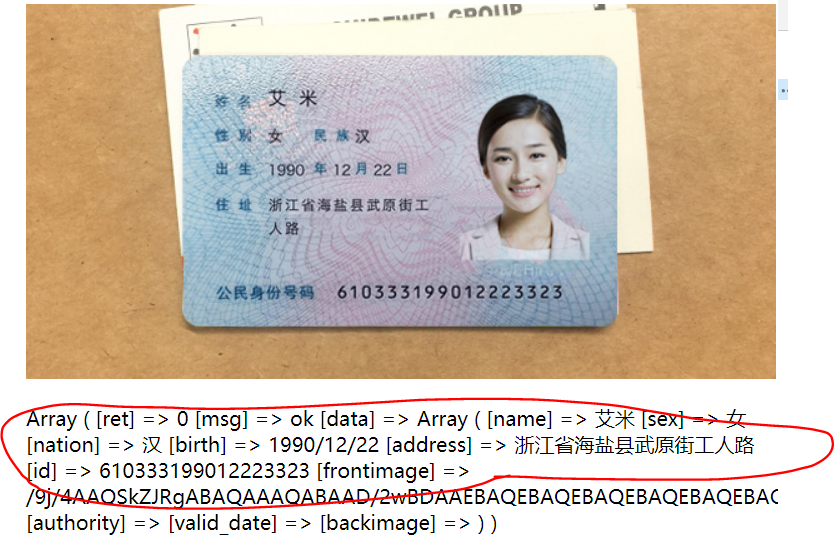 简单讲解:get_curl() http请求函数,getReqSign();签名函数【重要】,SFZ_OCR_() 接口请求函数,函数返回的是json,所有需要Json_decode才能看到数组。