
Featured image of post 【日常Py】PyMysql实现连接池及性能测试

【日常Py】PyMysql实现连接池及性能测试

博客数据被清空,再发一次

一,前言: 看这篇文章之前,如果你从未接触过连接池的话,建议你先看【这篇文章】,和本文类似;看完之后或许对你有所帮助。

二,相关知识:

  • 1.什么是数据库连接池? 数据库连接池负责分配、管理和释放数据库连接,它允许应用程序重复使用一个现有的数据库连接,而不是再重新建立一个;释放空闲时间超过最大空闲时间的数据库连接来避免因为没有释放数据库连接而引起的数据库连接遗漏。这项技术能明显提高对数据库操作的性能。

  • 2.实现原理 连接池基本的思想是在系统初始化的时候,将数据库连接作为对象存储在内存中,当用户需要访问数据库时,并非建立一个新的连接,而是从连接池中取出一个已建立的空闲连接对象。使用完毕后,用户也并非将连接关闭,而是将连接放回连接池中,以供下一个请求访问使用。而连接的建立、断开都由连接池自身来管理。同时,还可以通过设置连接池的参数来控制连接池中的初始连接数、连接的上下限数以及每个连接的最大使用次数、最大空闲时间等等。也可以通过其自身的管理机制来监视数据库连接的数量、使用情况等。

  • 3.Pymysql模块 PyMySQL是一个Python编写的MySQL驱动程序,让我们可以用Python语言操作MySQL数据库。 安装方法:```python pip install PyMySQL

  1
  2
  3
  4
  5
  6
  7
  8
  9
 10
 11
 12
 13
 14
 15
 16
 17
 18
 19
 20
 21
 22
 23
 24
 25
 26
 27
 28
 29
 30
 31
 32
 33
 34
 35
 36
 37
 38
 39
 40
 41
 42
 43
 44
 45
 46
 47
 48
 49
 50
 51
 52
 53
 54
 55
 56
 57
 58
 59
 60
 61
 62
 63
 64
 65
 66
 67
 68
 69
 70
 71
 72
 73
 74
 75
 76
 77
 78
 79
 80
 81
 82
 83
 84
 85
 86
 87
 88
 89
 90
 91
 92
 93
 94
 95
 96
 97
 98
 99
100
101
102
103
104
105
106
107
108
109
110
111
112
113
114
115
116
117
118
119
120
121
122
123
124
125
126
127
128
129
130
131
132
133
134
135
136
137
138
使用方法:移步菜鸟教程-》[Python3 MySQL 数据库连接 - PyMySQL 驱动](http://www.runoob.com/python3/python3-mysql.html "Python3 MySQL 数据库连接 - PyMySQL 驱动")


三,实现源码:

个人实现源码:Pymysql_pool.py
```python
# -*- coding: utf-8 -*-

class Mysql_pool:
    '''
    Author:小珏
    Version:1.0
    Last_time:2018-10-4 23:00 
    Start_time:2018-10-2 22:00 
    博客地址:http://qzone.work
    必须模块:queue,time,pymysql
    简单介绍:网上看了一些关于数据库连接池原理的文章,索性自己也写一个练练手,花了两天时间,跳了不少自己挖的坑。
    emmm..... 自己写的肯定还是有一些问题或者bug,后期有需要再慢慢维护;目前情况来看达到了自己预期的效果,如果不是大范围的数据操作,其实
    单个连接就已经足够,根据自己实际情况操作。
    '''
    ###//////数据库连接配置/////###
    Host='127.0.0.1'
    Port=3306
    User_DB='ceshi'
    User_name='ceshi'
    User_pass='123456'
    Charset='utf8'
    OutTime=600
    MaxTasks=300
    ###//////数据库连接配置/////###
    
    def __init__(self,Max=300,Min=5,Step=3,Wait_time=0.5,Condition=2):
        '''
        @param Min int 连接池最小数量
        @param Max int 连接池最大数量,实践测试高并发情况下会有轻微波动
        @param Step int 步长,单次增加的连接数量
        @param Wait_time int 递归阻塞时间/秒,适当阻塞可以提高资源利用率
        @param Condition int 连接创建条件,任务数与连接数倍数关系,默认2
        '''
        import time
        from queue import Queue
        self.Task=Queue(Mysql_pool.MaxTasks)
        self.Conn=list()
        self.Max=Max
        self.Min=Min
        self.Step=Step
        self.M_time=time
        self.Condition=Condition
        self.Wait_time=Wait_time
        
        self.keep_pool() 
    
    def db_conn(self):#创建单个连接并返回
        import pymysql as mysql
        ret=dict()
        conn=mysql.connect(host=Mysql_pool.Host,port=Mysql_pool.Port,db=Mysql_pool.User_DB,user=Mysql_pool.User_name,passwd=Mysql_pool.User_pass,charset=Mysql_pool.Charset)
        conn.autocommit(True)
        ret['conn']=conn
        ret['status']='0' #连接状态,0:空闲,1:繁忙
        ret['active_time']=int(self.M_time.time()) #添加时间,秒级别
        return ret
    
    def db_check(self):#检查连接池有效性,销毁超时空闲连接
        for x in self.Conn:
            if len(self.Conn) > self.Min and x['status'] == '0' and int(self.M_time.time())-x['active_time']>Mysql_pool.OutTime:
                x['conn'].close()
                self.Conn.remove(x)
                
    def db_close(self):#销毁整个连接池,销毁之后可通过,keep_pool恢复
        for x in self.Conn:
            x['conn'].close()
        self.Conn.clear()
    
    def db_reconn(self,index):#初始化一个连接,@param index 连接池列表坐标
        ### 1.更改连接为空闲状态 2.修改连接为最新时间 3.减少一个任务数
        New_date=int(self.M_time.time())
        self.Conn[index]['status']='0'
        self.Conn[index]['active_time']=New_date
        self.Task.get()
        
    def keep_pool(self):#维持连接池数量
        if len(self.Conn) < self.Min: #小于Min
            while len(self.Conn) < self.Min:
                self.Conn.append(self.db_conn())
        elif self.Task.qsize()/len(self.Conn)>self.Condition: #按步长增加一次
            for x in range(3):
                if len(self.Conn) < self.Max:
                    self.Conn.append(self.db_conn())
                
    def get_cursor(self):#成功返回游标,错误返回false
        from pymysql.cursors import DictCursor
        ret=None
        index=None
        self.db_check()
        for x in range(len(self.Conn)):
            if self.Conn[x]['status']=='0':
                index=x
                self.Conn[x]['status']='1' #繁忙
                ret=self.Conn[x]['conn'].cursor(DictCursor)
                break
        if ret == None:
            self.keep_pool()
            self.M_time.sleep(self.Wait_time)#阻塞,让其它线程可在阻塞时间内获得连接,防止递归过深
            return self.get_cursor()
        else:
            return ret,index
    
    def get_info(self):#返回字典,连接总数,空闲连接数,当前任务数
        ret=dict()
        ret['total']=len(self.Conn)
        free=0
        for x in self.Conn:
            if x['status']=='0':
                free+=1
        ret['total']=len(self.Conn)      
        ret['free']=free
        ret['tasks']=self.Task.qsize()
        return ret
        
    def sel_exec(self,SQL):#查询操作,返回二维列表,字典
        #///1.添加任务 2.取回游标 3.执行操作 4.关闭游标 5.重置游标
        self.Task.put(SQL)
        cursor,index=self.get_cursor()
        cursor.execute(SQL)
        ret=cursor.fetchall()
        cursor.close()
        self.db_reconn(index)
        return ret
    
    def up_exec(self,SQL):#增删改,成功返回操作数
        self.Task.put(SQL)
        cursor,index=self.get_cursor()
        ret=cursor.execute(SQL)
        cursor.close()
        self.db_reconn(index)
        return ret
    

调用Pymysql_pool.py源码:

 1
 2
 3
 4
 5
 6
 7
 8
 9
10
11
12
13
14
15
16
17
18
19
20
21
22
23
24
25
26
27
28
29
30
31
32
33
34
35
36
37
38
39
40
41
42
43
44
45
46
47
48
49
50
51
52
53
54
55
56
57
58
59
60
61
62
63
# -*- coding: utf-8 -*-


import threading,time,queue,hashlib,random
from mysql_pool import Mysql_pool

isRun=True
q=queue.Queue()

#=======================
tasks=1000   #任务数
treads=1     #并发线程数
#=======================


for x in range(tasks):
    rand_num_str=str(random.randint(100000,999999))
    username='admin_'+rand_num_str
    m=hashlib.md5()
    m.update(username.encode())
    password=m.hexdigest()
    sex=str(random.randint(0,1))
    age=str(random.randint(10,60))
    addtime=str(time.strftime('%Y-%m-%d %H:%M:%S',time.localtime()))
    sql="INSERT INTO `user`(`username`, `password`, `sex`, `age`, `addtime`) VALUES ('"+username+"','"+password+"','"+sex+"','"+age+"','"+addtime+"')"
    q.put(sql)

def info():
     global isRun
     while isRun:
        ret=db.get_info()
        res=db.sel_exec('select count(*) as count from `user` where 1')
        print('总数:',ret['total'],'空闲:',ret['free'],'任务:',ret['tasks'],'记录数:',res[0]['count'],'线程数:',threading.activeCount(),'耗时:'+str(round(time.time()-start,5))+'秒')
        time.sleep(1)     
        
def run():
    while not q.empty():
        sql=q.get()
        db.up_exec(sql)
        
def main():
    for x in range(treads):
        t=threading.Thread(target=run)
        t.start()

db=Mysql_pool()
start=time.time()

if __name__ =='__main__':
    main()
    info=threading.Thread(target=info)
    info.start()
    while True:
        try:
            if q.empty():
                print('耗时:'+str(round(time.time()-start,5))+'秒')
                isRun=False
                break
        except KeyboardInterrupt:
            isRun=False
            break
    res=db.up_exec('delete from `user` where 1')
    db.db_close()

单例连接实现源码:

 1
 2
 3
 4
 5
 6
 7
 8
 9
10
11
12
13
14
15
16
17
18
19
20
21
22
23
24
25
26
27
28
29
30
31
32
33
34
35
36
37
38
39
40
41
42
43
44
45
46
47
48
49
50
51
52
53
54
55
56
57
58
59
60
61
62
63
64
65
66
67
68
69
70
71
72
# -*- coding: utf-8 -*-

import pymysql as mysql,time,random,hashlib,queue,threading

host="127.0.0.1"                 #服务器ip
port=3306                            #默认端口3306
usdb="ceshi"                       #数据库名
user="ceshi"                            #数据用户
pawd="123456"                    #数据密码

isRun=True
q=queue.Queue()

#=======================
tasks=1000   #任务数
treads=1     #并发线程数
#=======================

for x in range(tasks):
    rand_num_str=str(random.randint(100000,999999))
    username='admin_'+rand_num_str
    m=hashlib.md5()
    m.update(username.encode())
    password=m.hexdigest()
    sex=str(random.randint(0,1))
    age=str(random.randint(10,60))
    addtime=str(time.strftime('%Y-%m-%d %H:%M:%S',time.localtime()))
    sql="INSERT INTO `user`(`username`, `password`, `sex`, `age`, `addtime`) VALUES ('"+username+"','"+password+"','"+sex+"','"+age+"','"+addtime+"')"
    q.put(sql)

def run():
    global is_conn
    
    while not q.empty() and isRun:
        if is_conn:
            is_conn=False
            cursor=db_conn.cursor(mysql.cursors.DictCursor)
            cursor.execute(q.get())
            cursor.close()
            is_conn=True
                
def info():
     while isRun:
         print('剩余:',q.qsize(),'已耗时:',str(round(time.time()-start,5))+'秒')
         time.sleep(1)  
         
def main():
    for x in range(treads):
        t=threading.Thread(target=run)
        t.start()
  
db_conn=mysql.connect(host=host,port=port,db=usdb,user=user,passwd=pawd)
db_conn.autocommit(True)
start=time.time()
is_conn=True #使用权

if __name__ == '__main__':
    main()
    info=threading.Thread(target=info)
    info.start()
    while True:
        try:
            if q.empty():
                print('耗时:'+str(round(time.time()-start,5))+'秒')
                isRun=False
                break
        except KeyboardInterrupt:
            print('强行结束,耗时:'+str(round(time.time()-start,5))+'秒')
            isRun=False
            break
    time.sleep(3)
    db_conn.close()

四,性能比较: 实现上面我分享的代码进行性能比较,环境是我个人PC,mysql数据库由phpstudy套件安装,未作任何优化或者其它配置修改。 比较方法:以不同线程数(模拟高并发)插入不同数据量所消耗的时间作为比较参考,下面直接给出最后的比较结果。 如图:数据库连接池性能比较.png
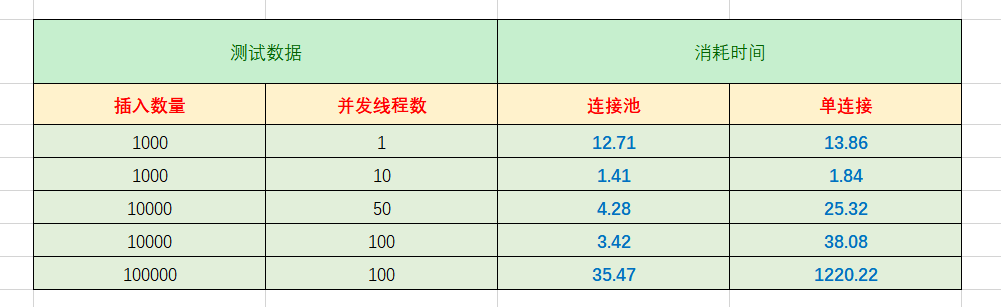
Ps:插入的数据库只有一张USER表;而上面的测试结果只是个人PC所测,每人PC性能各异,上面的数据只能仅供参考。

数据库结构:

 1
 2
 3
 4
 5
 6
 7
 8
 9
10
11
12
13
14
15
16
17
18
19
20

--
-- 数据库: `ceshi`
--

-- --------------------------------------------------------

--
-- 表的结构 `user`
--

CREATE TABLE IF NOT EXISTS `user` (
  `uid` int(11) NOT NULL AUTO_INCREMENT,
  `username` varchar(32) NOT NULL,
  `password` varchar(32) NOT NULL,
  `sex` tinyint(4) DEFAULT NULL,
  `age` tinyint(4) NOT NULL,
  `addtime` datetime DEFAULT NULL,
  PRIMARY KEY (`uid`)
) ENGINE=InnoDB  DEFAULT CHARSET=utf8 AUTO_INCREMENT=1 ;

五,结语 在小数据量和小并发情况下,连接池和单例连接性能差异并不大,但在高并发的情况下,连接池的优势就显而易见了,性能完胜单例十倍有余。 当然,没有最好的解决方案,只有根据应用场景的不同而选择合适的方法才是最佳方案。

针对这个实现的连接池,其实还有很多可优化的地方,功能只实现了基本增删改查,后面如若需要再添加吧。 性能测试.xlsx

使用 Hugo 构建
主题 StackJimmy 设计